
Released on October 29, 2025, Cursor 2.0 is a major update to the AI-driven code editor that promises a new multi-agent interface and the debut of Cursor’s own coding model, Composer.
As someone who uses Cursor every day, I couldn’t wait to try out the new 2.0 release. I spent some time exploring what’s new. Here’s my experience with the 2.0 release.
Composer model
One of the biggest highlights in Cursor 2.0 is Composer, the team’s first in-house AI coding model. Cursor describes it as a “frontier model” that delivers the same level of capability as others, but 4x faster. From my own testing and what others have shared, it definitely feels fast, making quick iterations smoother.
To see how well Composer performs, I tried the same test as I did before with the frontier models. But in this case, I will do it a bit differently, once is with a simple prompt of the requirement and once using my structured AI workflow (AI DevKit, which adds planning and testing steps around the agent).
Without AI DevKit
Composer jumped straight into coding and finished in about 2 minutes. The speed was amazing. I had working code almost immediately. However, the solution felt like a quick prototype.
The code was functional but bare-bones, lacking polish. I noticed I’d still need to tweak things (refactor some parts, add error handling, etc.) before considering it production-ready. It reminded me of the kind of output I’d get from Grok Code Fast 1 from the previous test.
About the speed, it’s fast, but still a bit behind what Claude Sonnet 4.5 performed in the previous test.
With AI DevKit
The process took longer overall (around 8 minutes total: ~2 min planning, 4 min coding, 2 min testing), but the outcome was much more robust. Composer first spent time generating a plan (breaking down the task, clarifying requirements), then wrote the code, and finally ran tests/verification.
The resulting code quality was night-and-day compared to the quick run. It implemented features like lazy-loading of data, navigating between images via keyboard, included proper error handling.
The code structure was cleaner, and the agent’s own test run. In short, this more thorough run produced output on par with what GPT-5 Codex produced in the previous test, much closer to production-ready.
In summary, Composer is quite amazing in the speed, but to compare with other frontier models such as Claude Sonnet 4.5 or GPT-5 Codex, it still needs a bit more guidance. If you just need a quick prototype, letting it run freely gets you results in no time. But if you spend a bit more time, either manually or with a workflow such as AI DevKit, the quality jumps significantly, making the output solid enough for real development.
Since the cost of Composer is similar to GPT-5 Codex, I still think Codex is a better choice if putting them side by side. But if you prefer the speed, you can consider Composer over GPT-5 Codex.
Output:
Without AI DevKit


With AI DevKit


Line of code:
Without AI DevKit
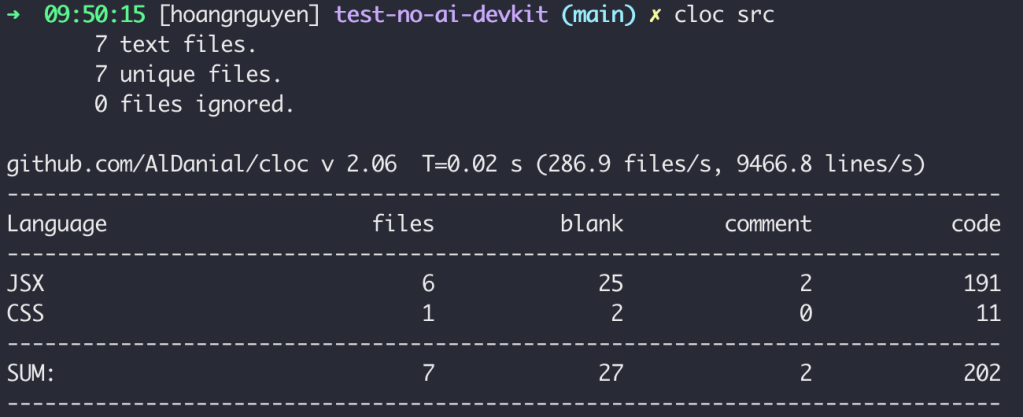
With AI DevKit

Multi-Agents
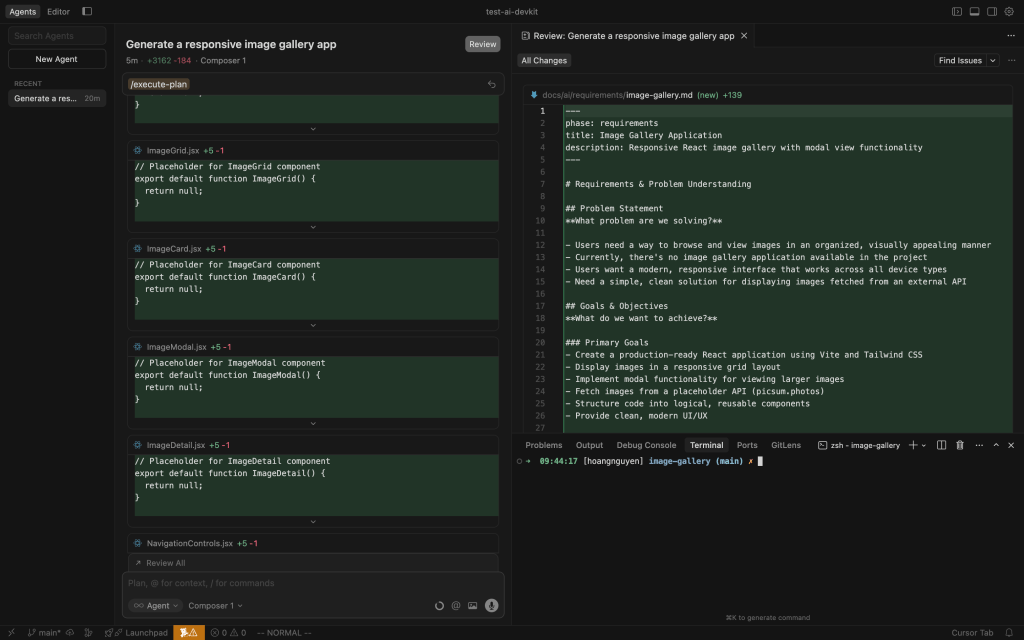
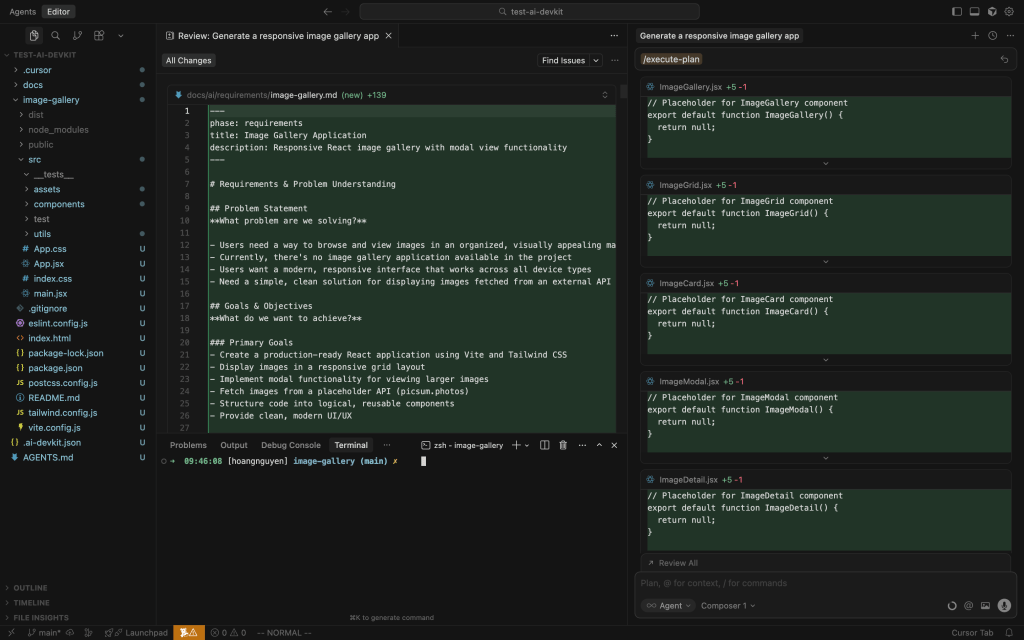
Personally, I think the new UI in Cursor 2.0 isn’t a big change. The agent view and editor view still look familiar, the main difference is the layout and where the panels are placed. We could already run multiple chats at the same time before this update, so the multi-agent interface isn’t entirely new, it’s just presented more clearly.
Agent UI
Editor UI
Under the hood, it uses git worktrees to give each agent its own isolated workspace so they don’t step on each other’s changes. In practice, this meant I could spin up a couple of agents to tackle different features (or the same feature with different approaches) without worrying about merge conflicts. The next problem is that “Does your laptop have enough resources to run multiple agents at the same time?”.
Functionally, running parallel agents worked smoothly for me. The UI allowed me to switch between each agent’s conversation and see their progress. One capability the Cursor team highlighted is that you can even have multiple models attempt the exact same prompt in parallel, then compare the results and pick the best solution. For example, you might run Composer alongside an OpenAI GPT-5 Codex agent, maybe even a Claude model, all tackling your feature request simultaneously. The idea is that for tough problems, this increases the chance that at least one agent comes up with a great solution. It is pretty cool to watch different AIs coding in parallel and then cherry-pick the winner or even combine insights.
That said, I’m not sure how often I’d use multi-model parallelism in everyday development. It definitely consumes more tokens/compute (since you’re effectively paying for two or three models to do the job of one), which might not be justified for routine tasks. I see it as a powerful feature for benchmarking model quality or tackling a really difficult problem where you want extra assurance. For most day-to-day feature builds, a single capable model usually suffices.
Overall, the new UI is cleaner and a bit more convenient, but it doesn’t fundamentally change how you work with Cursor.
Other highlights
Code review
One improvement I did notice is that all file changes are now grouped into a single review tab. In earlier versions, you had to open each file separately to see what the agent changed. Now, you can review everything in one place, similar to how we check diffs on GitHub or GitLab. It’s a small change, but it makes reviewing easier and more natural.

In-app Browser
I was really excited about the new built-in browser/DOM inspector tool.
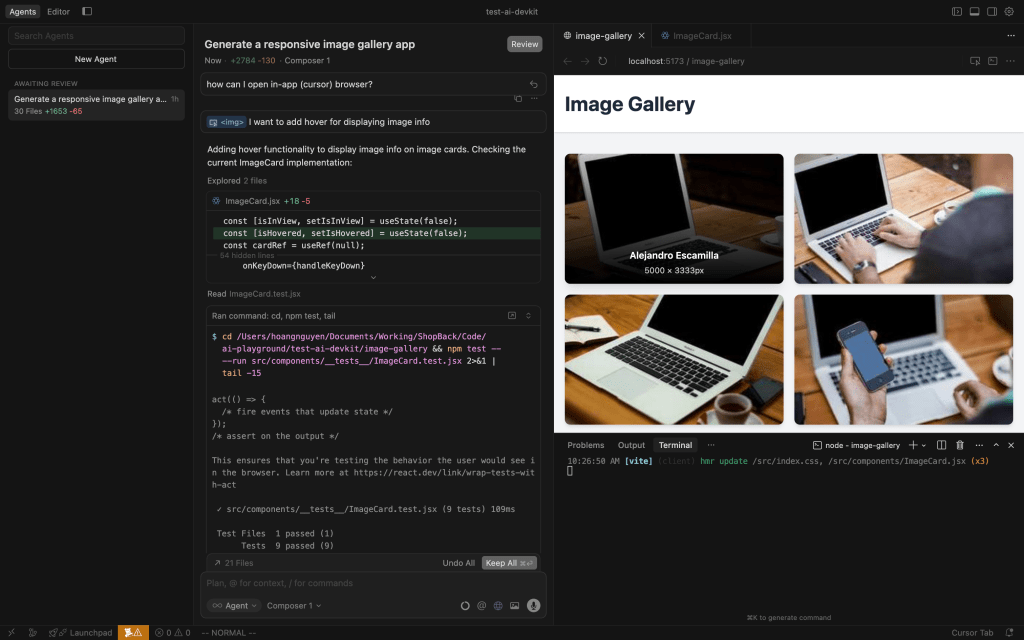
Cursor 2.0 now has a native browser panel that the agent can use to run, test the app, and also forward DOM information to the agent within the editor. In earlier versions, I had to set up a separate Model Context Protocol (MCP) server to let the AI agent interface with a browser for similar thing. This feature will significantly help front-end developers.
Other than that, Cursor 2.0 introduced a Voice Mode, which lets you control the coding agent with speech commands. Using built-in speech-to-text, you can speak your prompt or instructions, and even use custom trigger words to tell the agent when to start coding. I gave this a brief try, and to be honest, I don’t see how it is useful. Personally, I prefer the silence of typing and thinking through the problem. In my workflow, I often need to pause and consider output, tweak a prompt, etc., and doing that out loud felt a bit awkward.
Final take
After a few days of playing with Cursor 2.0, my overall impression is positive. Cursor 2.0 feels like a solid improvement rather than a big leap.
Composer is a good model, but it will need some time to catch up with other frontier models. Composer is fast, and when used with a structured workflow, it can produce reliable, production-ready code.
The review flow is easier to follow, but most of the core experience remains familiar. Multi-agent mode and the in-app browser are interesting additions.
Overall, it’s a nice upgrade that makes Cursor more polished and practical for everyday development.
Discover more from Codeaholicguy
Subscribe to get the latest posts sent to your email.
 Codeaholicguy
Great insights on Cursor 2.0! It’s fascinating how AI is pushing coding, much like how text to image | GPTProto is revolutionizing art.