
I spend most of my time in the AI DevKit agent console. I start one agent as the manager, usually Codex, and brainstorm with it. Once an idea becomes concrete enough to execute, I ask the manager to create another agent and hand off the work. That executor might run in Codex, Claude Code, Pi, or another harness depending on what I need.
The executor follows the dev lifecycle, implements the change, verifies it, and often creates the pull request without much intervention from me. I check progress with the manager instead of jumping between every agent session. When the pull request is ready, I review it, give feedback if needed, and merge it.
This is what lets me work on several things at the same time without turning my terminal into a wall of tabs.
I am not always at the keyboard either. When I step away, I connect the manager agent to Telegram and continue working with the same session from my phone.
AI DevKit gives me an agent manager, a shared operating model, and enough common context for different harnesses to work as one team.
The agent console
The main interface for me is the AI DevKit agent console.

The console gives me one place to open, message, and monitor agents across different harnesses. I can see what is running, which agent is waiting, and where I need to step in.
I still use commands such as agent list, agent detail, and agent send, but mostly for debugging, automation, or inspecting something the console does not make obvious. They are the low-level controls, not the center of my workflow.
I did not want a collection of commands that made me a faster dispatcher. I wanted an operating environment where one agent could manage other agents while I stayed focused on the problem.
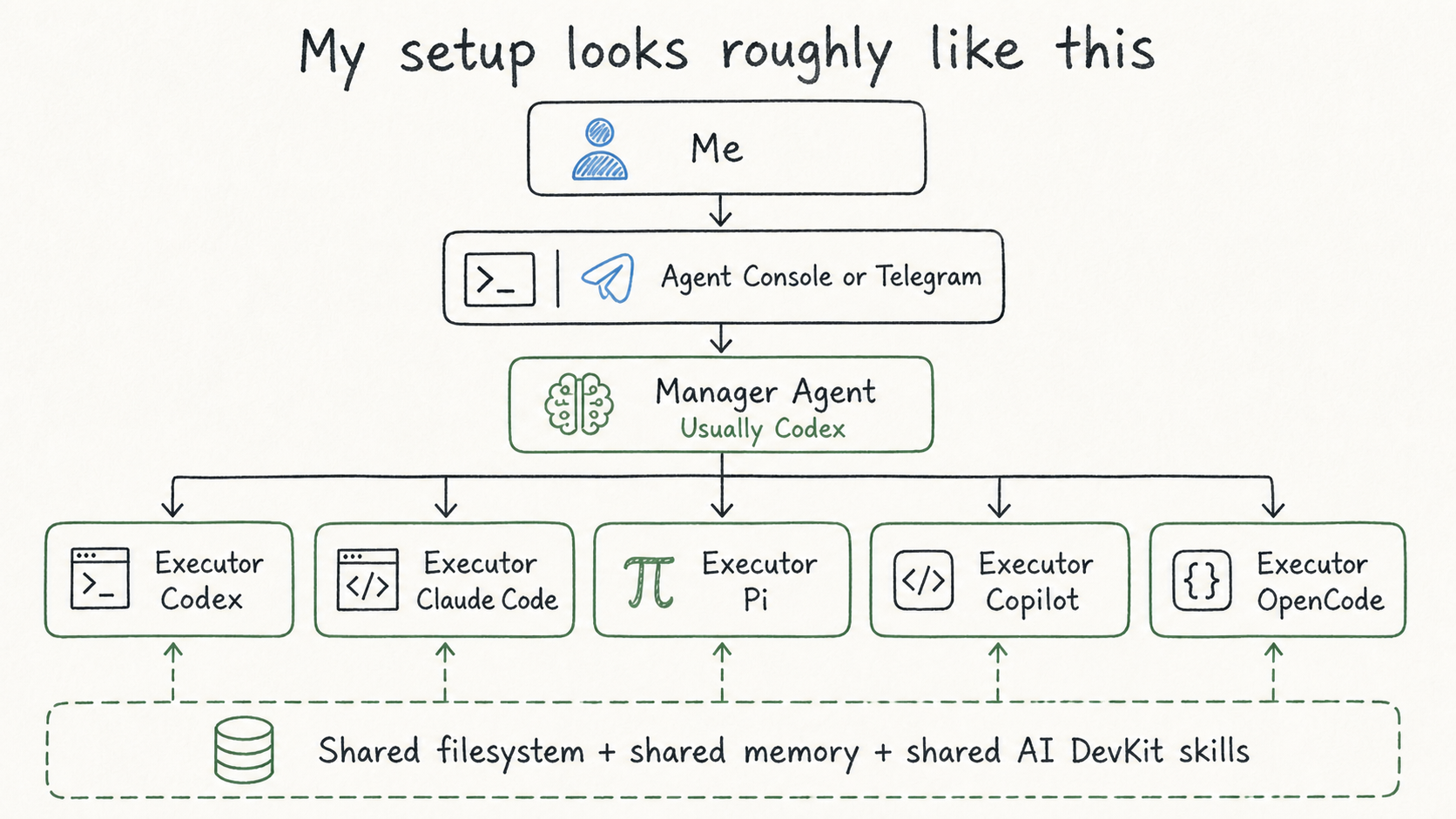
The manager does more than route messages. It keeps track of the goal, the active workstreams, dependencies between agents, and anything waiting for a decision. It also checks whether an agent claiming completion has actually produced a verified result.
I also mentioned in the previous post why I have so many executor types. Basically, I want to make full use of my subscriptions while also taking advantage of what each executor is good at and being able to run different models.
The manager follows me to Telegram
The agent console is my main interface when I am at the computer. When I am away from the keyboard, I use the AI DevKit channel connector.
I select the manager agent in the console and connect it to my configured Telegram channel. The bridge runs in the background, so I can close the terminal view and keep talking to the manager from my phone. I also have the same AI DevKit stack running on a VPS so that I can chat with the agent manager 24/7.
This is still the same manager session. Telegram is simply another transport into it. The manager keeps its working context, access to the filesystem and memory, and the ability to coordinate executor agents.
From Telegram, I can ask for progress, answer a question that is blocking an executor, give feedback, or ask the manager to start another piece of work. I do not need to wait until I am back at my desk to keep the orchestration loop moving.
The equivalent low-level command is:
ai-devkit channel start telegram \ --agent <manager-name> \ --daemon
I normally connect it from the console. The command is useful when I am debugging the bridge or automating the setup.
I encode the workflow in skills
Anything I expect to repeat becomes a skill.
This is a large part of how I keep different harnesses consistent. Codex, Claude Code, OpenCode, Pi, or any different harnesses have different capabilities and session behavior, but they can load the same engineering process from the repository.
The skills I use heavily for this workflow are:
agent-managementfor starting, selecting, inspecting, and stopping agents safelyagent-communicationfor sending assignments, reading recent context, and relaying results between agentsagent-orchestrationfor the repeated supervision loop: check progress, unblock agents, coordinate dependencies, and verify completiondev-lifecyclefor moving a change through requirements, design, planning, implementation, testing, and reviewverifyfor requiring fresh evidence before an agent says the work is done
The manager knows how to manage because that behavior is encoded in skills. The executor knows how to take a requirement through to a pull request for the same reason.
This saves me from writing a giant orchestration prompt every morning and makes the process reusable. If I replace Codex with another harness tomorrow, I do not want to redesign how my team of agents works.
The filesystem and memory are the shared context
Delegation fails when the new agent starts with an empty head.
The filesystem solves part of this. Source code, requirements, design decisions, plans, test results, and implementation notes live in files that every agent can read. An executor does not need the entire brainstorming transcript if the outcome has already been captured in a clear requirement and plan.
The filesystem is not enough, though. Some context does not belong in the codebase:
- a recurring repository convention that is easy to miss
- a decision made during an earlier task and the reason behind it
- a known failure pattern and the verified way to avoid it
- a personal workflow preference that applies across projects
I use AI DevKit memory for this layer. It stores narrow, reusable knowledge in local SQLite. Agents search it when a task needs context instead of loading everything into every session.
Memory is the key layer that lets different harnesses start with the same understanding. Codex may have one conversation history and Claude Code another, but both can read the same files and retrieve the same durable knowledge.
I think of the context model like this:
- Filesystem: current state and explicit project artifacts
- Memory: durable decisions, conventions, and verified lessons
- Session: temporary reasoning and the conversation happening now
Keeping these separate also prevents memory from becoming a dumping ground. I do not store raw conversations, temporary progress, or guesses. If a future agent is unlikely to reuse it, it does not belong in memory.
My actual day-to-day loop
1. Start a manager
I usually start a Codex agent as the manager and keep that session alive. It becomes my main interface for the work, even when the actual implementation happens elsewhere.
The manager has the agent-management, agent-communication, and agent-orchestration skills. Actually, in my setup, these skills are installed globally. This gives it the ability to create agents, inspect their state, send follow-up instructions, and supervise work across several passes.
I still own the outcome. The manager owns the coordination loop.
2. Brainstorm before creating workers
I use the manager as a thinking partner first. We explore the problem, challenge assumptions, compare approaches, and narrow the idea.
I do not spawn an executor for every thought. That would create activity, not progress. I wait until there is something worth handing off: a requirement to develop, an investigation to run, a design to review, or a plan ready to execute.
This is also where human judgment has the most leverage. Agents can execute a well-framed task remarkably well. They are much less useful when several of them are confidently solving the wrong problem in parallel.
3. Ask the manager to create the right executor
Once the direction is clear, I tell the manager what I want executed. Sometimes I name the harness. Other times I describe the demand and let the manager choose between Codex, Claude Code, Pi, or another available agent.
A typical instruction is closer to this than a long shell command:
We have agreed on the requirement and approach. Create an executor agent in an isolated worktree, hand over the relevant context, and have it continue the dev lifecycle through implementation, testing, review, and PR creation. Monitor it and tell me when you need a decision or when the PR is ready.
The handoff includes the objective, scope, relevant files, constraints, validation expectations, and the artifact the executor should produce. The shared filesystem and memory carry the rest of the context.
The manager also prevents two executors from editing the same files at the same time. Parallel work needs clean boundaries or separate worktrees. Otherwise, the time saved during implementation comes back as conflict resolution.
4. Let the manager supervise
After the handoff, I usually move on to another idea or another workstream.
The manager runs the orchestration loop. It checks agent status, inspects anything waiting or stale, relays necessary information, and sends corrections without duplicating instructions. If one executor depends on another, the manager sequences the work.
I check in with the manager rather than opening every executor session:
What is the current progress? Is anything blocked or waiting for me?
Most updates do not need my involvement. I care about exceptions: a product decision, an unresolved conflict, repeated failures, a security-sensitive action, or a result that cannot be verified.
This is where agent orchestration becomes different from launching a few background processes. Someone, in this case the manager agent, owns the loop until the work is complete or genuinely blocked.
5. Step into the executor when needed
Even with a manager, I sometimes open the executor session from the console and get involved myself. This can easily be done by choosing the agent in the AI DevKit Agent Console and pressing “o”.
I usually do this when the agent is drifting, a technical trade-off needs a quick back-and-forth, or I want to steer the implementation before it goes too far. Direct interaction has more bandwidth than relaying every detail through the manager.
Once the direction is clear again, I leave the executor to continue and let the manager resume supervision. The manager remains my default coordination path, while direct access is always available when it is faster.
6. Review the pull request
For a well-prepared task, the executor can often complete the dev lifecycle and create the pull request on its own.
I still review every pull request as an engineer: does it solve the original problem, are the trade-offs acceptable, is the diff understandable, and is the verification strong enough?
If I have feedback, I give it to the manager. The manager can send the work back to the same executor or create another review pass. Once I am satisfied, I merge.
My role moves up a level. I spend more time on framing, judgment, and review, while agents handle more of the execution and coordination.
How I choose a harness
I do not assign permanent job titles to tools. Codex is not always the implementer, and Claude Code is not always the reviewer.
I choose based on the work, the context already available, the model that I want to use, and what I need from that session. I may also want a different harness for a fresh perspective. The choice can change as the tools change.
This is another reason the shared layer matters. The dev lifecycle, project memory, and task artifacts should survive a change in harness; I might stop the execution in the middle and continue the process with a different harness. Tool preference should not become workflow architecture.
What makes the workflow scale
The practical benefit is that I no longer need to personally carry every task from idea to pull request in one continuous block of attention.
While one executor implements a feature, another can investigate a production issue, and I can brainstorm the next idea with the manager. I return when a decision or review needs me.
There are still limits, such as parallel work increases review load and poorly framed tasks fail faster. A manager without strong skills becomes a message-forwarding bot.
A few principles keep the setup useful:
- One manager owns the coordination loop.
- Executors receive bounded work and clear artifacts.
- I can step into an executor session when direct steering is faster.
- Skills carry the process across harnesses.
- Files and memory carry shared context across sessions.
- Worktrees or file boundaries isolate parallel changes.
- Fresh verification is better than an agent’s completion message.
- The human owns the final decision.
The engineer remains responsible, but spends attention in different places.
Start with a manager and one executor
If you want to try this workflow, start small:
npx ai-devkit@latest setupnpx ai-devkit@latest agent console
Choose the harnesses you already trust. Start one manager and give it the agent orchestration skills. Brainstorm one real task, capture the result in files, and ask the manager to create one executor to carry it through the development lifecycle.
Then watch where the handoff loses context. Encode the repeated fixes in skills. Store durable decisions in memory. Add another executor only when the first loop is reliable.
If my sharing is helpful to you, subscribe to my blog. I share what I learn while building real systems with AI in the loop. You can also follow me on X or Threads for more thoughts and ongoing experiments.
Discover more from Codeaholicguy
Subscribe to get the latest posts sent to your email.


Treating agents as teammates with their own scopes and review loops is the mental shift that makes multi-agent setups maintainable. The part most guides skip is what you touched on implicitly: once several agents draw from the same subscription pool, the constraint that shapes the team is not model quality but the usage window – who gets to run, and when. Tracking reset timing per tool has mattered as much as prompt design in my own setup, which is why I ended up keeping a small independent tracker of Codex reset windows (https://codexreset.today/). The AI DevKit structure looks like a clean way to make those roles explicit.